How Do I Add a Favourite on Home?
Favourites are shortcuts to the people who matter most. Their location permissions stay the same as in People.
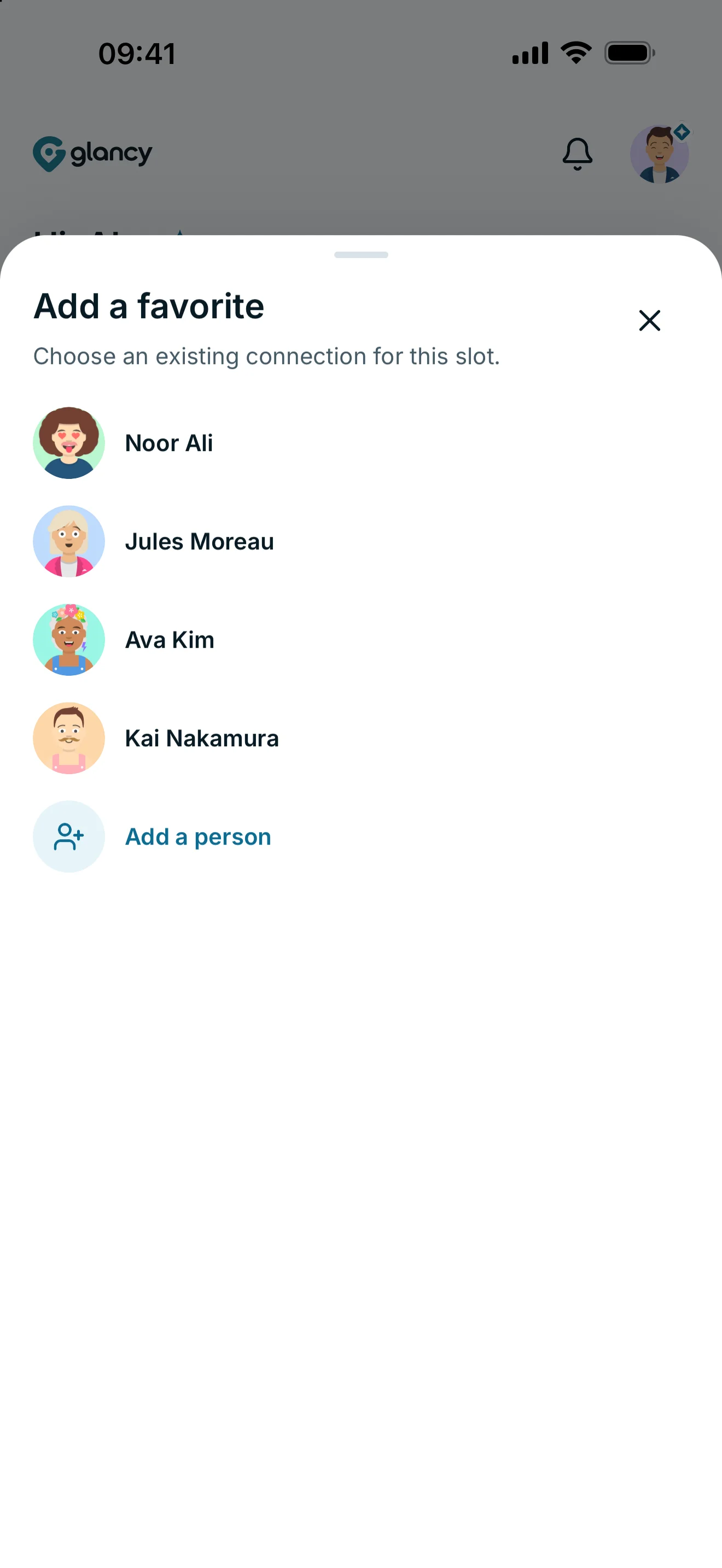
On Home, tap a free Add favorite slot and select an accepted connection. The person appears in that slot. There are three favourite slots for free and eight with glancy+.
Pin a person to Home
- Open Home.
- Under your important people, tap a free slot with a plus sign (Add favorite).
- Select an existing connection.
- The person appears in that slot.
People already pinned as favourites are not offered again. If someone is missing, check whether your connection request has been accepted. Create a connection first if necessary.
Slots and ordering
You have three favourite slots without a subscription and eight with glancy+. A locked slot points to the additional Plus slots; it does not mean your connection is broken.
Drag a filled tile to another unlocked position to rearrange it. Tapping a favourite opens that person’s location view. You can only access the location if their permissions allow it.
Adding a favourite does not share your location or change the other person’s access rights.
Frequently asked questions
Why is someone missing from the picker?
Your connection must be accepted, and the person must not already be pinned as a favourite. A pending request is not enough.
Does this give the person more access?
No. A favourite is a shortcut on your Home screen. Location permissions are managed separately.