How Do I Remove a Favourite from Home?
Tidy up your Home screen without deleting a connection or changing anyone’s location access.
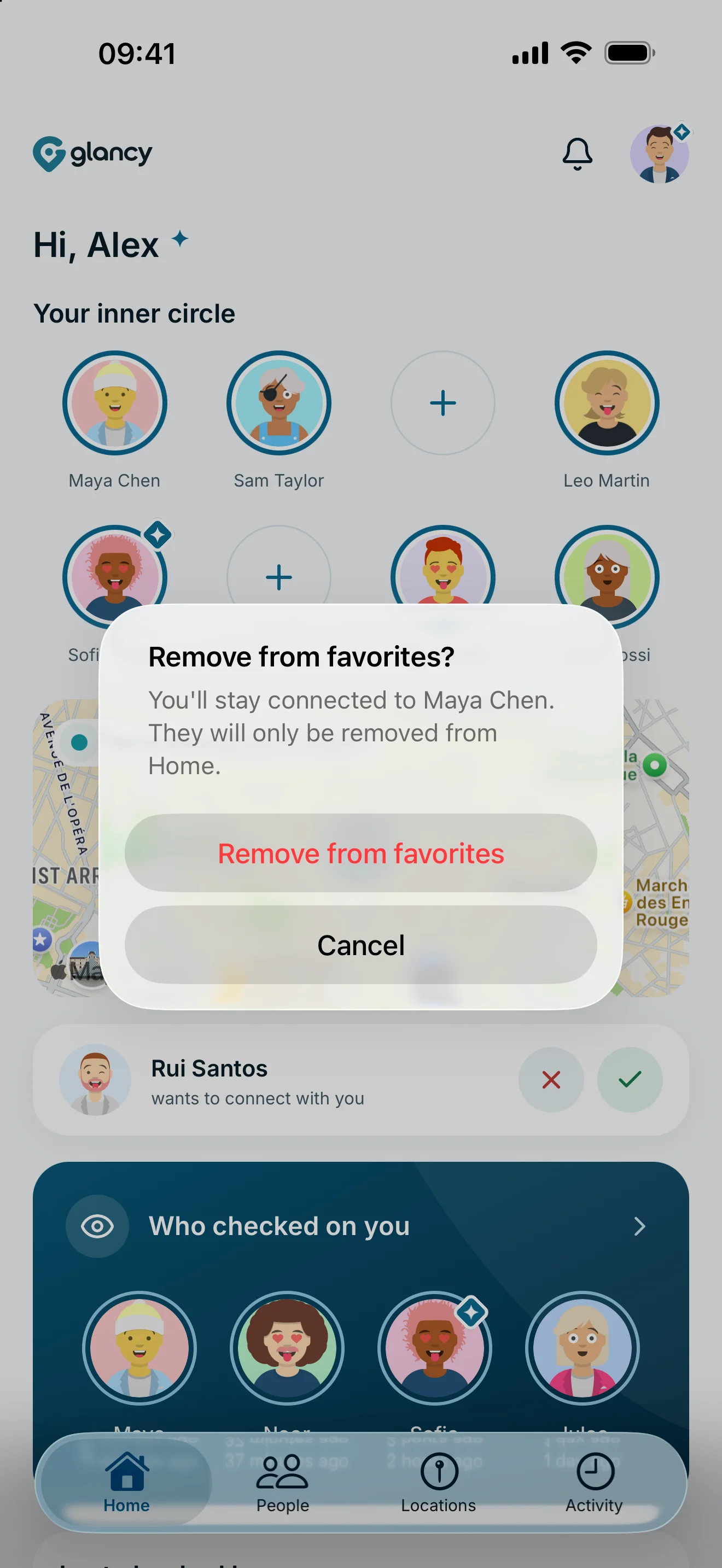
Press and hold the person’s tile on Home, then confirm Remove from favorites. The slot becomes available again. Your connection and existing location permissions remain in place.
Remove a favourite
- Open Home and find the favourite tile.
- Press and hold the tile until the confirmation appears.
- Check the person’s name.
- Confirm Remove from favorites, or choose Cancel.
The tile disappears and its slot becomes available. The person remains under People. You can add them as a favourite again later.
Favourite, connection and location access
A favourite only controls who you can reach quickly on Home. Removing it does not change a sharing rule. If the person could see your location, they still can within the permissions you set.
To change access, open the person and edit their permissions or the relevant group rule. To end the connection, use Remove connection. Use the global pause for a temporary break from all location sharing.
If you just want the tile elsewhere, drag it to another unlocked slot instead of removing it.
Frequently asked questions
Can the person still see my location?
Yes, if your existing sharing rule allows it. Removing a favourite does not change location access.
Can I add the favourite again?
Yes. Tap a free favourite slot and select the person again. Your connection must still exist.